Message Crawler
Built because chat data deserves a closer look before it ships.
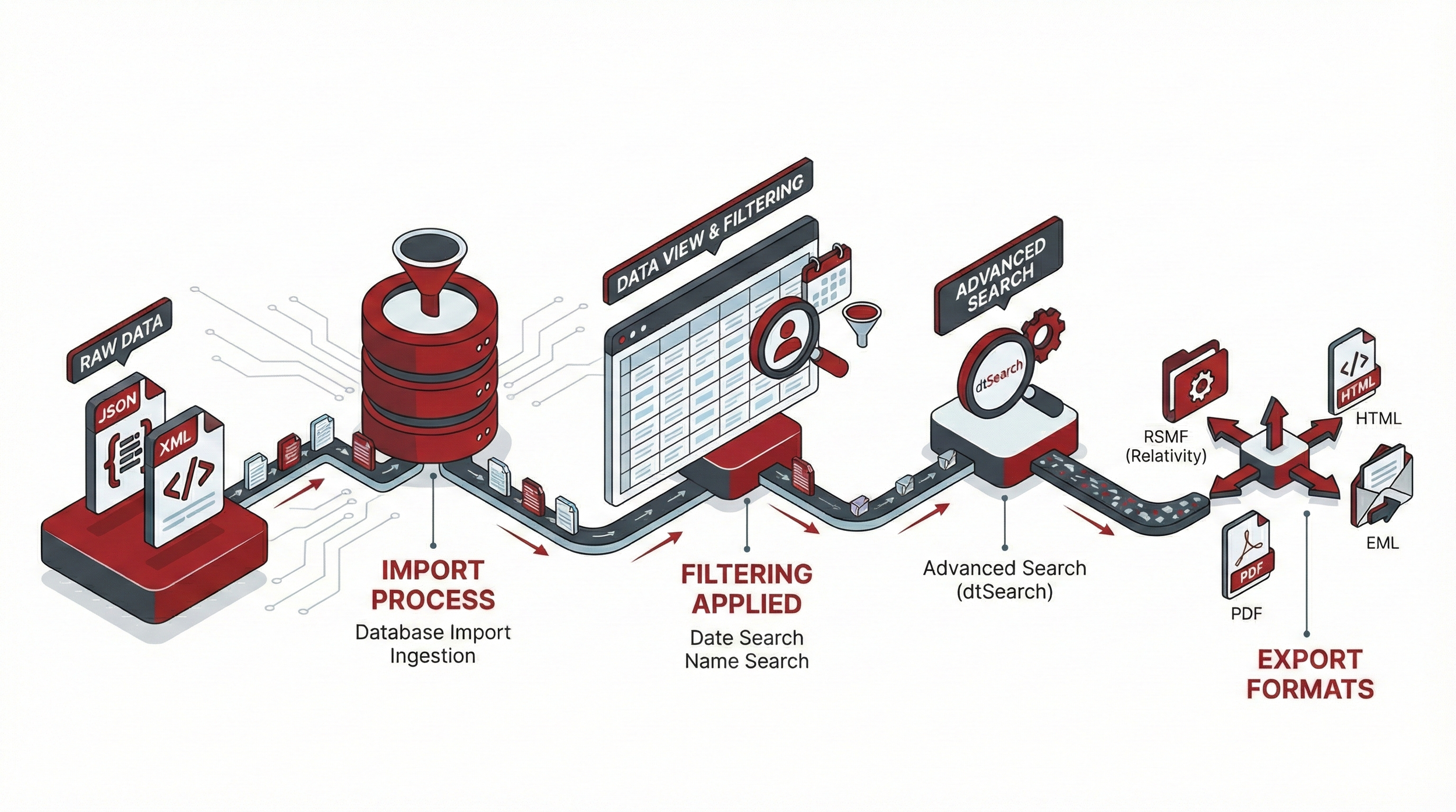
Message Crawler is a Windows desktop application for processing chat and short-message data. Slack, Teams, WhatsApp, Cellebrite, Telegram, and dozens of other sources go in; RSMF, PDF, and DAT files come out. Between those two ends, you can actually look at the data, deduplicate it, normalize names, fix time zones, run keyword searches, tag and export — instead of treating chat data as a black box that funnels through unread.
What it does
View and inspect
- Documents view. Every record in the database, in a sortable grid you can filter and sample.
- Conversation view. See messages grouped into the conversations they belong to, with participants, dates, and message counts.
- Native preview. Render attachments — PDFs, images, office files — without leaving the application.
Clean and prepare
- Deduplicate records using the standard Bates approach or a custom hash on fields you choose.
- Name normalize contacts so John Smith, j.smith, and Smith, John collapse into one identity. Original names are preserved so you can roll back any decision.
- Time-zone convert message dates between source and target zones — including a "process in a different zone than the load file" workflow for multi-jurisdictional reviews.
- Project-level conversations treat the same Slack channel imported from two different exports as one conversation, so participants and messages combine cleanly.
Search and tag
- Search bar with default and custom saved searches, AND/OR logic, and a Names-search mode for finding everything someone said.
- dtSearch keyword indexing for full-text search across message bodies and extracted text. Supports proximity, phrase, fuzzy, and wildcard syntax.
- Tagging with five modes: tag the document, the family, the conversation, the day, or a configurable range of messages around it.
Transform and export
- Mass update, search and replace, date format, and renumber tools for bulk changes across a search.
- Export to RSMF, PDF, EML, HTML, or DAT — or all of them at once via Universal Export.
Data sources supported
Message Crawler reads chat and short-message data from a wide variety of sources:
- Chat platforms. Slack, Microsoft Teams (multiple HTML versions plus PST), WhatsApp, Telegram, Discord, Zoom, Webex, MatterMost, Zoho Cliq, Lark, Meta Workspace, Facebook, Instagram, LinkedIn, ChatGPT.
- Forensic and mobile-collection tools. Cellebrite, Oxygen, Axiom, Elcomsoft, ModeOne, Belkasoft, XRY, iMazing, SyncTech, Apple Chat.DB.
- Trading-floor and email tools. Bloomberg IM, Bloomberg XML, Google MBOX/PST, Google JSON, MBOX (including Google Vault and Android SMS sync), Threema, Twitter.
- Direct-format imports. RSMF (with built-in fixer for malformed files), JSON, XML, SQLite, ZIP archives.
If your data is in a format not on this list, ask. Adding new sources is part of the regular development cycle.
Export formats
- RSMF (v1 and v2). Relativity Server 2023 and earlier uses v1; RelativityOne and Server 2024 use v2.
- PDF — including embedded native attachments for self-contained delivery, with optional Bates stamping.
- EML — for review platforms that ingest email-style chat.
- HTML — for direct sharing or web-style preview.
- DAT — Concordance-compatible load files.
- Universal Export — produce multiple formats simultaneously from a single job.
How it works
Message Crawler is built around four objects: Documents (everything loaded), Searches (saved queries that drive most other work), Jobs (how import, transform, and export actually happen), and Log (everything that's been done).
Jobs use a distributed model — large datasets break into smaller tasks that run in parallel across as many agents as you make available. A real-world Slack import of 32 million records on a typical SQL Server has been processed in about six hours.
You choose your database backend at setup: MS SQL for production work, MySQL as a free alternative, SQLite for small datasets and demos, or a Custom connection string for unusual setups.
Purchase